Try this before you read on. Take out your phone, open your own website as if you were a hungry stranger, and find the price of your most popular dish. Count the seconds.
If it took more than three, or you had to pinch and zoom, you've just seen what your guests see. Most of them won't wait as long as you just did. They don't complain, they don't call. They quietly book somewhere else, and you never find out they were there.
Most restaurant menus online still live in a PDF. It made sense when websites were read on desktop screens. Today most guests look you up on a phone, often while deciding where to eat in the next half hour, and a PDF is the hardest way to read a menu on a small screen.
This guide explains what a PDF menu costs you, what a good online menu looks like, and how to switch without rebuilding your whole website.
Key Takeaways
- A PDF menu forces phone users to pinch, zoom and scroll sideways, and many simply give up and pick another restaurant.
- Google ranks your site on its mobile version, and a menu written as real text on a web page is easier for search engines and screen readers to read than a PDF.
- A good online menu is plain text with sections, prices, dietary labels and a few strong photos, with an Order or Book button next to it.
- You can keep a printable PDF for catering or events. Just don't make it the only menu.
What's wrong with a PDF menu?
A PDF is a printed page squeezed into a screen. On a phone, that creates four problems.
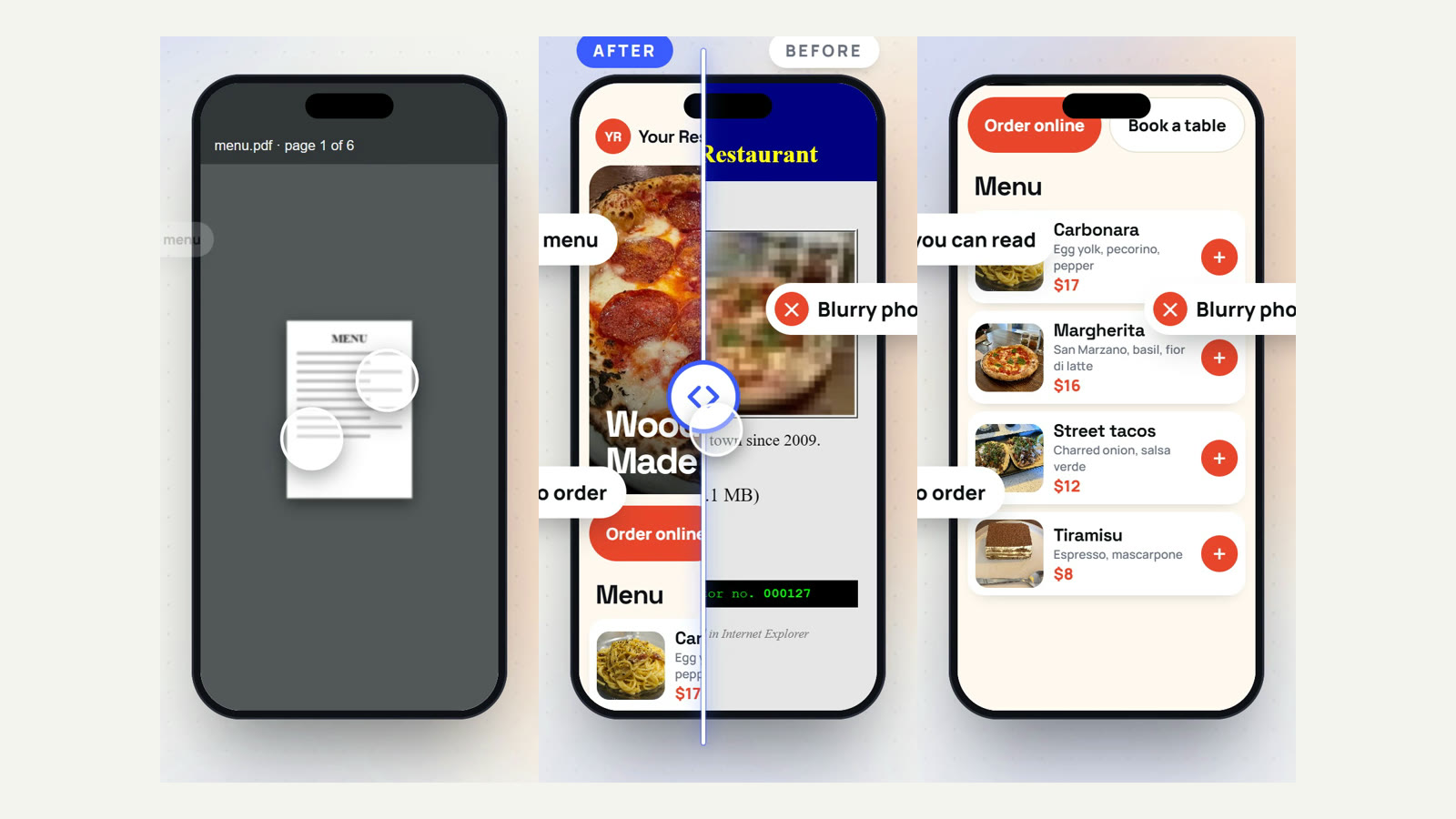
It's hard to read. A menu designed for A4 or Letter paper shrinks to a tiny page. Guests have to pinch to zoom, then drag sideways line by line. Many don't bother, and the restaurant down the road is one tap away.
It's slow. Menu PDFs are often several megabytes, especially when they include photos. On mobile data, that can mean a blank screen while the file downloads.
It's hard to update. Changing one price means editing the design file, exporting a new PDF and uploading it again. So prices go stale, sold-out dishes stay listed, and guests complain at the till.
It's hard for some guests to use at all. The UK government's guidance on publishing documents says PDFs "do not work well with assistive technologies like screen readers a lot of the time" and recommends HTML "wherever possible" (GOV.UK, Publishing accessible documents). An untagged PDF, which is what most design tools export by default, isn't considered accessible at all (WebAIM, PDF Accessibility).
Does a PDF menu hurt your Google ranking?
It doesn't help it. Google says it uses "the mobile version of a site's content, crawled with the smartphone agent, for indexing and ranking" (Google Search Central). Google can read text inside many PDFs, but a menu written as real text on your web page is the clearest signal of what you serve. That matters for searches like "vegan ramen near me" or "gluten free pizza".
A web menu can also use the schema.org Menu markup, which describes sections, dishes and prices to search engines in a structured way.
Your Google Business Profile matters even more for local searches. Food and drink businesses can list menu items with descriptions and prices directly on their profile, and changes can take 24 to 48 hours to show on Maps and Search (Google Business Profile Help, About the menu editor). Keep that menu and your website menu the same. Our Google Business Profile checklist for restaurants walks through it.
What should a good online menu include?
A good online menu is boring in the best way: fast, clear and easy to scan with one thumb.
The essentials
- Real text, not an image or PDF, so it is sharp on every screen and can be read aloud by screen readers.
- Sections guests expect: starters, mains, sides, desserts, drinks. Keep the section names short.
- A price on every item. Missing prices make people assume the worst.
- Short descriptions: the main ingredients and how it's cooked, in one line.
- Dietary and allergen labels: vegetarian, vegan, gluten free, contains nuts. Add a line telling guests to ask staff about allergies.
What turns a menu into orders
- A handful of strong photos of your best-selling dishes. Not every item needs one.
- An Order or Book button next to the menu, so a hungry guest can act right away. If you already pay delivery apps for repeat customers, our guide to moving repeat orders to your own site shows why this button matters.
- Opening hours and address near the menu, because "are they open now?" is the next question.
A quick example
A PDF line might read: Margherita 12.5 / Diavola 14 / Funghi 13.5, in a tiny font inside a scanned page.
The same items on a web menu:
Margherita · $12.50 San Marzano tomato, fior di latte, basil. Vegetarian
Diavola · $14.00 Spicy salami, chilli oil, mozzarella.
[Add to order]
Same food, but now a guest can read it in two seconds and order in one tap.
Score your own menu in 60 seconds
Be honest. Give yourself one point for every "yes":
- My menu opens as a normal page, not a file download.
- I can read every price on my phone without zooming.
- Every price on it is correct today.
- Dietary labels (vegan, gluten free) are on the menu.
- There's an Order or Book button right next to it.
- My Google profile shows the same menu and prices.
6 points: you're ahead of most independent restaurants. Keep it fresh. 3 to 5 points: guests can find you, but some leave before they order. These are the easiest wins you have. 0 to 2 points: your menu is likely sending hungry people to your competitors every day, and you can't see it happening because they never call.
The good news: every "no" on this list is a fix, not a rebuild.
How to switch from a PDF to an online menu in a week
You don't need a new website to start. Here is a simple plan.
- Day 1: Type it out. Copy every item, description and price into a plain document. Fix old prices and remove dishes you no longer serve.
- Day 2: Group and label. Put items into sections and add dietary labels. Pick 5 to 8 dishes for photos.
- Day 3: Take the photos. Daylight by a window, a plain table, phone camera from slightly above. Natural light beats any filter.
- Days 4–5: Put it on your site. Add the menu as a normal web page (most website builders have a menu or text block), not as a file upload. Add your Order or Book button next to it.
- Day 6: Update Google. Copy the same items and prices into your Google Business Profile menu, and point the menu link to your new page.
- Day 7: Swap the links. Replace the PDF link on Instagram, your QR codes and your delivery bags with the new menu page.
If your current site makes this hard, it may be time for a redesign. You can browse our restaurant website designs to see how a menu, photos and online ordering fit together on one page, or read our guide to restaurant website templates.
Should you keep a PDF at all?
Yes, as an extra. A printable PDF is still handy for catering orders, group bookings and events, where people want to download and share a file. Link to it from your menu page with a clear label like "Download the catering menu (PDF)". Just make sure the main menu, the one people see first, is a proper web page.
Frequently Asked Questions
Is a PDF menu bad for SEO?
It's not ideal. Google can index text in many PDFs, but it ranks sites on their mobile version, and a menu written as real text on a web page is clearer for search engines and for guests on phones. A web menu can also use schema.org Menu markup.
Can I just put a photo of my menu on my website?
A photo has the same problems as a PDF, and worse: search engines and screen readers can't read the text at all, and it's blurry when zoomed. Use real text, and keep photos for the food.
How often should I update my online menu?
Whenever a price or dish changes. With a web menu this takes minutes, which is the main reason to switch. Update your Google Business Profile menu at the same time.
Do I need online ordering to replace my PDF menu?
No. A clear web menu is the first step and helps on its own. Adding an Order or Book button later turns menu readers into customers without the commission delivery apps charge.
Not sure how your menu scored? Let us look for you
It's hard to judge your own menu. You already know every dish, so you read it the way you wrote it, not the way a stranger does.
That's why we run a free audit for independent restaurants in the USA, Canada, the UK and Europe. We open your website, menu and Google profile the way a new guest would, and send back one page: what's costing you customers, and the first three things we'd fix. It takes two minutes to ask, there's no call unless you want one, and you keep the report either way.
Get my free menu and website audit, or see what we build for restaurants.
Sources checked on 25 October 2026: Google Search Central (mobile-first indexing), Google Business Profile Help (menu editor), GOV.UK (publishing accessible documents) and WebAIM (PDF accessibility).